Unlock Ultimate Security for Your Strapi APIs.
The only Plug & Play Multi-Factor Authentication solution built exclusively for Strapi. Now with passkeys, trusted devices, enforcement policies, and native Strapi 5 integration. Effortless to install. Seamless to scale. Unmatched protection.




Simplify API Security. Focus on
Building.
SMS-based authentication
Enable SMS verification to send a unique one-time code

Backup codes
Generate one-time backup codes for users, ensuring they can access their accounts.

Authentication with TOTP
Add an extra layer of security to your Strapi
instance with time-based one-time passwords.

Discord
info@strapi.io
123456

sophia@moving-heads.io
654321

Robert@exlusiverealestate.com
987654

Headlockr
Richard@tigertech.com
456789
Multi-device compatibility
Support multiple devices

Imac Peter

Ipad Anna

Iphone John

Macbook Jane
Effortless, no-code setup
Quickly integrate MFA into your Strapi CMS without writing a single line of code. Privacy first design, no cloud involved.

Secure Strapi with MFA. Then enforce it properly
Headlockr started as a secure MFA layer for Strapi. It now extends into policy-driven admin security: enforce enrollment per role, detect compromised passwords, reduce prompt fatigue with trusted devices, and integrate natively with modern Strapi builds.
Try a Free Demo.
Before you Lock-in.
Built for Developers.
Powered by Security.





Ready to secure your Strapi CMS?
Experience the future of Strapi security with our multi-factor authentication plugin. Designed for developers, built for simplicity—get started today with a seamless setup and cutting-edge protection for your CMS.


“
HeadLockr is the extra security layer your Strapi project needs to support Multi-Factor Authentication
Pierre Burgy
CEO, Strapi

Built for Performance .
Designed for Security.
From admin panel to content API (coming soon), every part of your Strapi project is protected. Multi-factor authentication that’s effortless to set up and powerful enough to keep your APIs secure. Whether you use SMS, TOTP, or email, our plugin adapts to your workflow.
With Multi-factor Authentication (MFA), your system is protected against brute-force, phishing, and man-in-the-middle attacks, ensuring that only authorized users can access your Strapi backend.
Multi-factor Authentication (MFA) enhances security by adding multiple layers of protection, making unauthorized access significantly more difficult. By requiring multiple forms of identity verification, such as a password, a one-time code, or biometrics, MFA protects your system from common security threats like brute-force attacks, phishing attempts, and man-in-the-middle attacks. This ensures that only users with valid credentials, in addition to a secondary authentication method, can access your Strapi backend, providing a highly secure environment for sensitive data and administrative functions.
MFA adds an extra layer of security to your Strapi backend, making it harder for attackers to gain unauthorized access by requiring multiple forms of verification.

In today’s digital environment, credential theft is a prevalent risk as attackers use stolen passwords to gain unauthorized access to systems. MFA significantly reduces this threat by requiring an additional verification step, beyond the traditional username and password, for each user. Even if an attacker obtains a user's login credentials, they won’t be able to gain access without passing the secondary authentication. This makes MFA an effective defense against a range of security threats, such as social engineering and spear-phishing attacks, by adding a strong layer of protection to your Strapi backend.
MFA is a recommended security best practice by industry standards such as NIST and GDPR, ensuring that your Strapi backend meets the highest security requirements.

Adhering to established security standards is crucial for organizations, especially when handling sensitive data. Many industry standards, including NIST, GDPR, and SOC 2, recommend or mandate MFA as part of their compliance frameworks to ensure the protection of user data and maintain trust. By implementing MFA within your Strapi backend, you align with these stringent guidelines, making your infrastructure more robust and compliant with industry regulations. This also demonstrates your commitment to upholding high-security standards, giving clients and stakeholders confidence in your system's integrity.
Our MFA plugin is designed for developers of all skill levels, with an easy, no-code setup that allows you to quickly integrate MFA into your Strapi project without any hassle.

Security doesn’t have to be complicated, and our MFA plugin is designed with that in mind. The no-code setup means that even developers with minimal experience can configure and deploy MFA in their Strapi projects without needing extensive knowledge of complex security protocols. With intuitive configuration options, our plugin provides a straightforward integration process, allowing you to add MFA with just a few clicks. This empowers teams to enhance their security posture without investing significant time or resources into setup, ensuring a hassle-free experience for developers at any skill level.
Our MFA plugin offers a range of security features, including SMS, TOTP, and email verification, to give you peace of mind knowing that your Strapi backend is secure.

Our MFA plugin is equipped with multiple authentication options, including SMS-based verification, Time-Based One-Time Passwords (TOTP), and email verification, giving you flexibility to choose the method that best suits your needs. These options enable stronger protection for your backend, ensuring that only authorized users can gain access. The plugin’s security features are designed to adapt to evolving security requirements, making it easy to scale as your user base grows. This robust suite of features provides peace of mind, knowing that your backend is well-protected against unauthorized access and data breaches.
MFA is designed to provide an effortless user experience, with seamless authentication that adapts to your workflow, making it easy for users to access your Strapi backend securely.
Security should not come at the cost of user experience. Our MFA plugin is designed to be as unobtrusive as possible, providing an authentication process that integrates seamlessly with your users’ workflow. The plugin offers an adaptable authentication experience, allowing users to access your Strapi backend without unnecessary friction, while still ensuring high security. Whether accessing the backend for administrative tasks or content management, users will experience a smooth, intuitive process that doesn’t compromise on security, making it easy and enjoyable to use your Strapi application.
Headlockr 5 adds passkeys, trusted devices, enforcement policies, and password health controls while keeping the setup native to Strapi.
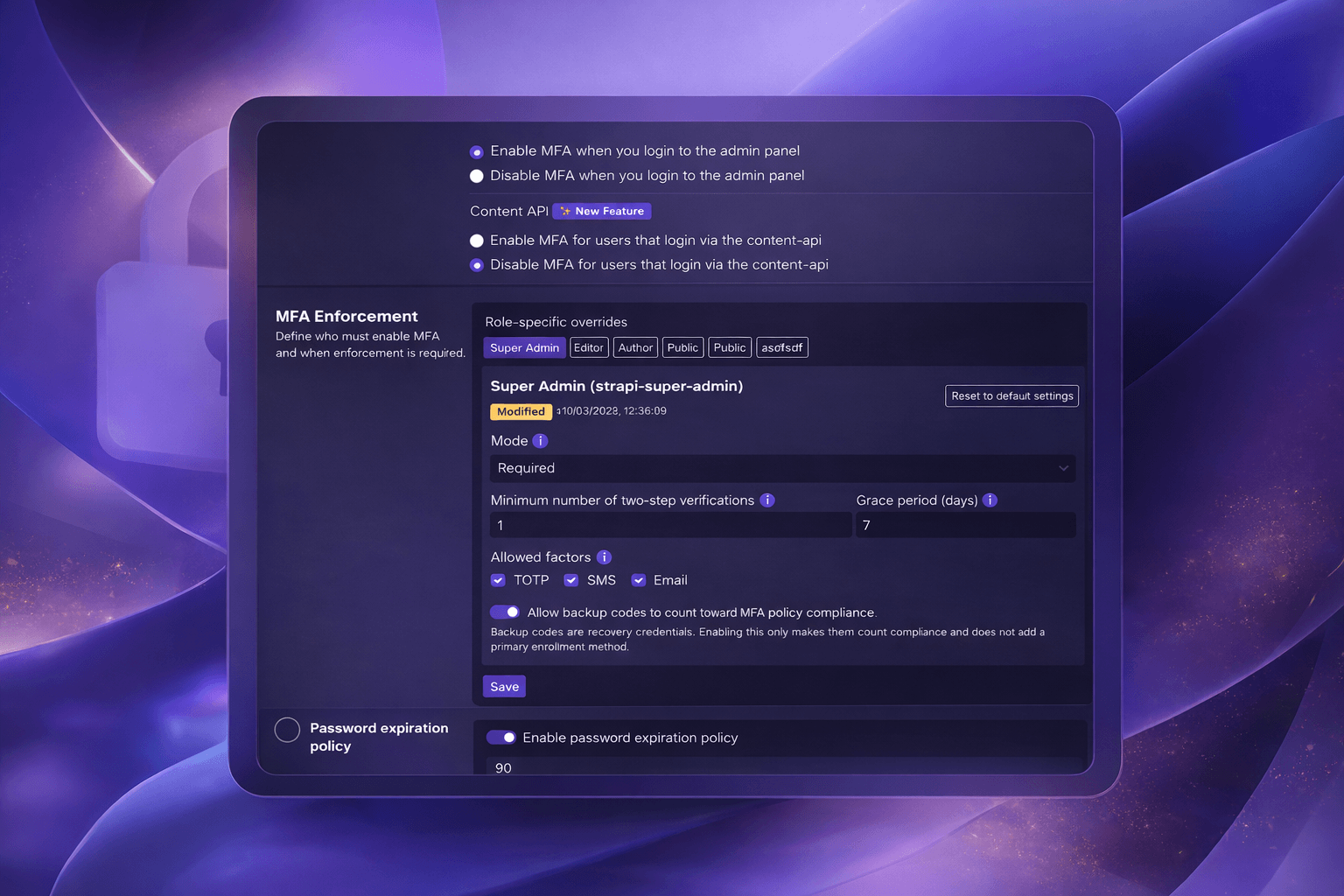
Headlockr 5 expands beyond MFA methods alone. You can now roll out passkeys, trusted devices, MFA enforcement policies, password expiration, and breached-password detection while keeping the installation flow native to Strapi. That means stronger controls for administrators without bringing back the old Vite or Webpack setup overhead.
Enhanced security against unauthorized access
Multi-factor Authentication (MFA) enhances security by adding multiple layers of protection, making unauthorized access significantly more difficult. By requiring multiple forms of identity verification, such as a password, a one-time code, or biometrics, MFA protects your system from common security threats like brute-force attacks, phishing attempts, and man-in-the-middle attacks. This ensures that only users with valid credentials, in addition to a secondary authentication method, can access your Strapi backend, providing a highly secure environment for sensitive data and administrative functions.
Buy Headlockr 2FA with a 7-day money-back guarantee.
Get every feature without limitations, deploy to production, and keep your users secure. If Headlockr is not the right fit, you can rely on the 7-day money-back guarantee.
5-minute install
Individual
Ideal for individuals with basic MFA needs
€9,99 / Month
Get started now- ✔️1 project
- ✔️Secure Strapi admin panel with MFA
- ✔️Full MFA access (SMS, Email, TOTP, Backup codes)
- ✔️Email, TOTP and SMS verification 2FA
- ❌Passkeys
- ❌MFA enforcement policies
- ❌Multi project license
Developer
Best value for multi-project developers with early access to premium features
€22,99 / Month
Get started now- ✔️Everything from the individual plan
- ✔️3 projects
- ✔️Priority updates
- ✔️Early access to new features (SDK, React components)
- ✔️Multi-project support
- ✔️Email support
- ✔️Backup codes for device recovery
- ✔️Passkeys✨ new
- ✔️Content API Multifactor Authentication
Agency
Ideal for businesses who need MFA security at large scale
€29,99 / Month
Get started now- ✔️Everything from the Developer plan
- ✔️Supports up to 7-10 projects
- ✔️Priority updates
- ✔️Early access to new features (SDK, React components)
- ✔️Multi-project support
- ✔️Email support
- ✔️Backup codes for device recovery
- ✔️Premium support (response time < 4h)
- ✔️Content API Multifactor Authentication
- ✔️MFA enforcement policies✨ new
- ✔️Password expiration policy✨ new
- ✔️Passkeys✨ new
Individual
Ideal for individuals with basic MFA needs
€9,99 / Month
Get started now- ✔️
1 project
- ✔️
Secure Strapi admin panel with MFA
- ✔️
Full MFA access (SMS, Email, TOTP, Backup codes)
- ✔️
Email, TOTP and SMS verification 2FA
- ❌
Passkeys
- ❌
MFA enforcement policies
- ❌
Multi project license
Developer
Best value for multi-project developers with early access to premium features
€22,99 / Month
Get started now- ✔️
Everything from the individual plan
- ✔️
3 projects
- ✔️
Priority updates
- ✔️
Early access to new features (SDK, React components)
- ✔️
Multi-project support
- ✔️
Email support
- ✔️
Backup codes for device recovery
- ✔️
Passkeys✨ new
- ✔️
Content API Multifactor Authentication
Agency
Ideal for businesses who need MFA security at large scale
€29,99 / Month
Get started now- ✔️
Everything from the Developer plan
- ✔️
Supports up to 7-10 projects
- ✔️
Priority updates
- ✔️
Early access to new features (SDK, React components)
- ✔️
Multi-project support
- ✔️
Email support
- ✔️
Backup codes for device recovery
- ✔️
Premium support (response time < 4h)
- ✔️
Content API Multifactor Authentication
- ✔️
MFA enforcement policies✨ new
- ✔️
Password expiration policy✨ new
- ✔️
Passkeys✨ new

7-day money back! 🤯
Need Something More?
Let’s Talk.
If your project requires more than what’s offered in our standard plans, we’ve got you covered. Whether you need custom solutions, enterprise-level support, or have specific security requirements, we’re here to help.
Book a 30-minute call
✨ Frequently Asked Questions ✨
Headlockr 5 fits right into
your existing Strapi setup
Install the package, add your license, configure the plugin, and ship. Headlockr 5 no longer requires custom Vite or Webpack wiring for the Strapi admin panel.
Add this to your .npmrc file
Loading code block

Just run this command to start installing MFA for Strapi
yarn add @headlockr/headlockr @tanstack/react-query@^5.56.2Add this to your .npmrc file
Loading code block
Just run this command to start installing MFA for Strapi
npm install @headlockr/headlockrAdd the license key that you received by email into the .env file
HEADLOCKR_LICENSE_KEY=enter-your-license-key-here
vite.config.js or Webpack changes.Configure Headlockr inside config/plugins.js or config/plugins.ts just like any other Strapi plugin. This is where you enable passkeys, trusted devices, and the rest of your security setup.
Upgrading from Headlockr 4.x?
Remove the old custom Vite/Webpack Headlockr setup before installing v5. The legacy install flow is still documented for older projects.
Headlockr 5 uses native Strapi integration, so the old admin bundler setup is no longer required.
That’s it. Check out our documentation to ensure you have the latest instructions.
Get monthly product
updates from Headlockr
Sign up for our newsletter
And dont worry we wont spam you till death cause in the end this is about developing and securing your Strapi.